Showing category "resources" (Show all posts)

How to flash Doogee s40 firmware stock

Posted by Darryl Banua on Friday, December 4, 2020,
    If you are looking for a stock rom for Doogee s40, we have it, sometimes  we need to flash a phone when it getting a problem
    or having a trouble, also when we just like to make some experiment, 

    if your Doogee S40 device has bricked due to some issues or improper flashing, follow the full guide. Most of the Doogee devices come with Mediatek MT6739 chipset and Doogee S40 is also the same. It comes out of the box with Android 9.0 Pie OS and offers great value for money. In case, if you have roote...

    Continue reading ...
     

    How to flash samsung firmware stock using odin

    Posted by Darryl Banua on Tuesday, December 1, 2020, In : computer 

    here is a way to flash your samsung if it is not working good or you wan't to erase everything , 

    Follow this steps:

    Step 1: Download and install Samsung USB Driver on your computer (if Samsung USB Driver is already installed on your computer,  (SKIP this step).


    USB Logo

    Step 2: Download and extract Odin Downloader on your Computer (if you already have Odin Downloader  (SKIP this step).

    Odin Logo

    Step 3: Download and extract Samsung Stock Firmware (4 files) on your computer. After extracting the firmware you will b...
    Continue reading ...
     

    how to create bootable usb using disk part

    Posted by Darryl Banua on Sunday, November 8, 2020,

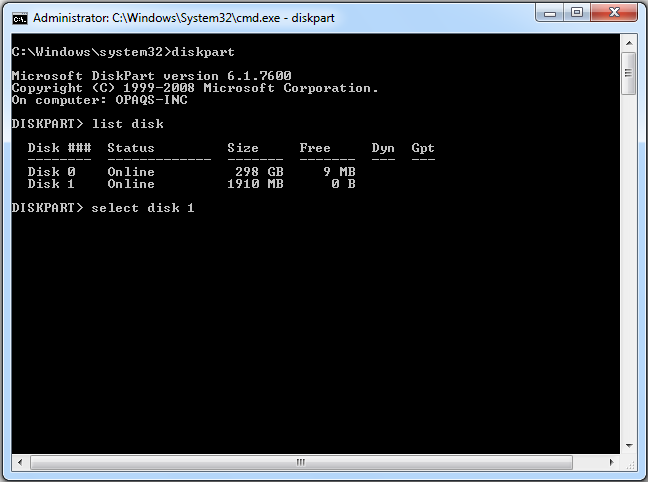
    Step 1: Using DISKPART Command

    Using DISKPART Command
    1. Insert your USB flash drive to your running computer. As the first step, we need to run Command Prompt as administrator. To do this, we need to find cmd by typing 'cmd' in the search box on Windows Start Menu. After search result for 'cmd' appears, right click on it and select "Run as administrator".
    2. Type 'diskpart' on Command Prompt (without quotes) and hit Enter. Wait for a while until the DISKPART program run.
    3. Type 'list disk' to view active disks on your comput...

    Continue reading ...
     

    7 File Hosting Websites with Direct Download Links for Free Users

    Posted by Darryl Banua on Monday, October 19, 2020, In : internet 

    If you want to  upload a file so that it can be distributed to others, there are hundreds of different services to perform that task. File hosting comes in different categories and a popular type is cloud hosting where you can use services like Google Drive, Microsoft OneDrive, DropBox and iCloud. These are more geared towards personal storage and sharing files with friends, family and work colleagues.

    Other file hosting options include services more suited to posting the links anywhere so tha...


    Continue reading ...
     

    nissan qasquai 2011 stepboard bar mounting photos

    Posted by Darryl Banua on Monday, October 19, 2020, In : automotive 


    Continue reading ...
     

    Nissan Qashqai 2014+ side steps/running boards fitting guide

    Posted by Darryl Banua on Monday, October 19, 2020, In : automotive 

    Parts list Parts


    Quantity

    Front Bracket 2
    Rear Bracket 2
    Middle Bracket 2
    T bolts + fixings 2
    U bolts + fixings 2

    Step 1: get the vehicle on some ramps (if possible) Step 2: Front brackets You will need to locate this fixing point in the chassis for the T bolt to fit in, allowing the bracket to be fitted correctly


    Steps 3: Rear Brackets


    Step 4: Middle Brackets


    Step 5: Fitting the boards


    Step 6: General care and maintenance


    Continue reading ...
     

    DiskPart Command-Line Options

    Posted by Darryl Banua on Saturday, October 17, 2020, In : computer 
    DiskPart is a text-mode command interpreter in Windows Vista, Windows® XP, and the Windows Server 2003® family. This tool enables you to manage objects (disks, partitions, or volumes) by using scripts or direct input at a command prompt.


    DiskPart Commands

    Before you can use DiskPart commands on a disk, partition, or volume, you must first list and then select the object to give it focus. When an object has focus, any DiskPart commands that you type act on that object.

    You can list the availabl...


    Continue reading ...
     

    how to Create a recovery drive

    Posted by Darryl Banua on Saturday, October 17, 2020, In : computer 

    It's a good idea to create a recovery drive. That way, if your PC ever experiences a major issue such as hardware failure, you'll be able to use the recovery drive to reinstall Windows 10. Windows updates to improve security and PC performance periodically so it is recommended to recreate the recovery drive annually. Personal files and any applications that did not come with your PC will not be backed up. You'll need a USB drive that's at least 16 gigabytes.

    Warning: Use an empty USB drive bec...


    Continue reading ...
     

    Create a Bootable USB Flash Drive

    Posted by Darryl Banua on Saturday, October 17, 2020, In : computer 
    Applies To: Windows Server 2016 Essentials, Windows Server 2012 R2 Essentials, Windows Server 2012 Essentials

    You can create a bootable USB flash drive to use to deploy Windows Server Essentials. The first step is to prepare the USB flash drive by using DiskPart, which is a command-line utility. For information about DiskPart, see DiskPart Command-Line Options.

    Tip

    To create a bootable USB flash drive for use in recovering or reinstalling Windows on a PC instead of a server, see Create a recover...


    Continue reading ...


    Make a free website with Yola